Keep things moving with loops
Some work should happen without anyone asking: triage new reports each morning, tidy up on Fridays, send a failed
check back to the agent that built it, measure after a release. A loop is one small file that runs an aayu
command on a schedule. A loop that needs an agent runs in your agent's own scheduler, as you, so your CI never calls
a model. A loop that needs no agent (agent = false) runs free in GitHub Actions.
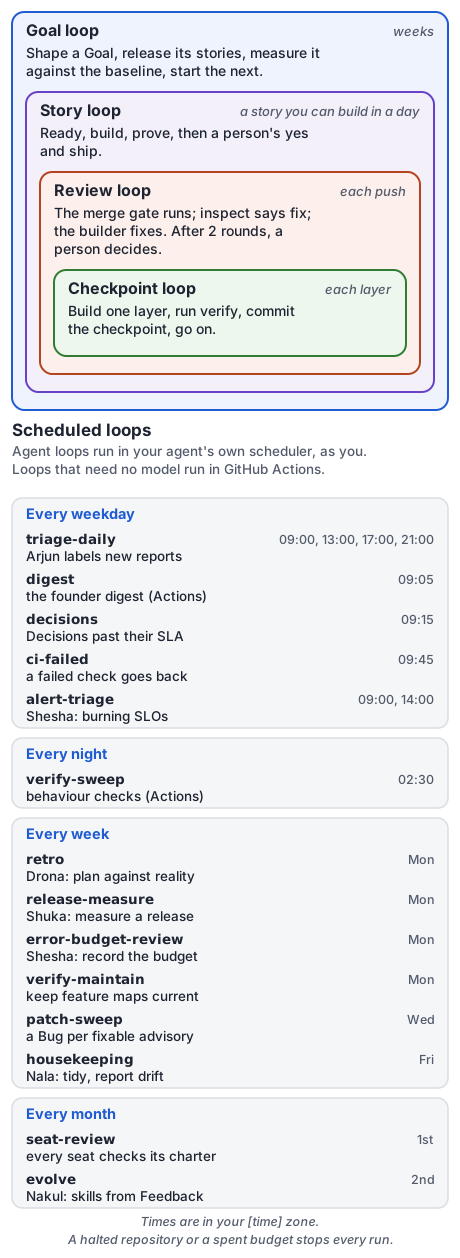
Fast loops inside, slow loops outside. The scheduled loops keep them moving.
You are here: Level 3. Loops work at any level, but they pay off once work flows steadily.
Needs aayudha 0.2. If
aayu versionprints 0.1.x, this page is ahead of your binary: runaayu self-update. Until 0.2 is released,go install github.com/rahulnakmol/agentic-ayudha/cmd/aayudha@devinstalls the build this page describes.
What you get
The first time you run aayu install --loops (below) in a repository with no loops/ folder, it adds the default
loop files from aayudha's loops folder and renders them for every tool, so there is nothing to copy.
The nightly verify-sweep installs your dependencies and the Playwright browser with the package manager your
lockfile names (pnpm, Bun, or npm); edit its setup_run if your checks need more. Commit them. They do nothing until
you set them up. To change a loop later, edit its file and run
aayu init --gates, which renders them again.
| Loop | Runs | Does |
|---|---|---|
triage-daily |
Weekdays 09:00 | Lists every open intake issue; your agent labels each as Feedback, Bug, or Incident |
ci-failed |
Weekdays 09:45 | For a story handed to another agent, sends a failed required check back to it |
release-measure |
Mondays 10:30 | Runs measure when a release was published that week |
housekeeping |
Fridays 16:00 | Cleans up, then reports setup drift, feature-map drift, and stale Ready issues |
retro, evolve |
Mondays, monthly | The retro, and skill evolution, which takes new Feedback |
digest |
Weekdays 09:05, in Actions | The founder digest; it needs no agent |
verify-sweep |
Daily 02:30, in Actions | Runs every behaviour check with no model; a failed check turns the run red |
Times are in [time] tz from your config. Every run starts with a guard that stops it while the repository is halted
or over budget.
Honest status: loops run on a schedule only in 0.2. Starting a loop when something happens on GitHub, such as an issue being opened, is planned for a later version.
Set them up in one tool
Pick one agent tool to run all the agent loops. If two tools ran them, every loop would run twice. The loops that need
no agent (agent = false, such as digest and verify-sweep) are not set up in a tool: the GitHub Actions fallback,
.github/workflows/aayudha-loops.yml, runs them, and install --loops says so.
aayu install --loops
It asks which tool should run them, offering only the ones it finds here (Amp, Cursor, Claude Code, or Codex), then sets them up there or prints exactly what to paste:
- Amp: run
aayu install --loops --host amp --apply. It starts one Amp thread per loop in your project, which sets the loop's schedule, and records each one. - Cursor: with Terraform and a Cursor API key in
CURSOR_TOKEN,--applycreates the automations. Without them, paste each prompt fromloops/cursor/automate.mdinto a Cursor agent session; its/automateskill does the rest. - Claude Code: paste each
/scheduleprompt fromloops/claude/routines.mdinto Claude Code (v2.1.225 or later, signed in with your claude.ai account). Each becomes a routine. - Codex: paste each prompt from
loops/codex/scheduled-tasks.mdinto a Codex or ChatGPT chat in the desktop app. Each becomes a scheduled task.
If loops/active.json says loops are already set up in another tool, it warns you first. Delete them there, then
forget them: aayu install --loops --host <that tool> --record <loop>=.
Test one loop now. At the end, it offers to run one loop once. You can also run it yourself:
aayu install --loops --host amp --run-now triage-daily
You should see the loop's report in your terminal: the intake issues it classified, or nothing to do.
When a tool gives you an ID for a loop you set up by hand, record it, so aayudha can tell you later if it went stale:
aayu install --loops --host claude --record all=<the routine names>
You should see each recorded loop as active in aayu doctor's loops row, with the tool that runs it, and each
agent = false loop as active in actions. A loop you changed after recording it shows as stale, one you never set
up as missing, and one that runs twice (recorded in two tools, or in a tool and Actions) as double.
Stuck? See loop problems.
Honest status: "active" means recorded with the loop's current contents; no tool lets aayudha read your automations back. On Amp,
aayu install --loops --host amp --applyset up aayudha's own agent loops live, one Amp thread each;digestandverify-sweeprun in Actions. The Cursor, Claude Code, and Codex prompts follow each tool's documentation and have not been run on a real account yet.
Under the hood
The loop format, each tool's render and setup, and the guard are in hand-offs, agent environments, and loops.
What's next
- Let a failed check go back by itself: hand work to an agent.
- See what the retro and evolve loops produce: did it work?