Bring in analytics and errors: PostHog and Sentry
A Goal is only as good as its number, and "did it help?" needs the same number again after the release. If your product's usage lives in PostHog and its errors in Sentry, aayu can read both: it fetches a Goal's baseline instead of anyone typing it, measures the Goal the same way later, and reads experiments out. It only reads. The key you give it is checked before any data call, and a key that could write is refused.
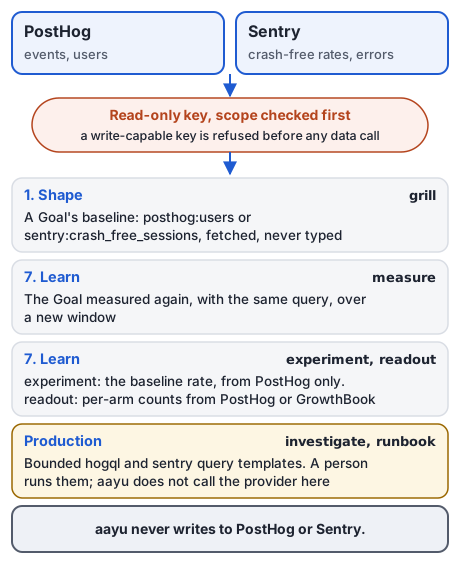
Data comes in read-only. Nothing goes back.
Honest status: both adapters are tested against synthetic replies written from PostHog's and Sentry's API references, request by request. Neither has been run against a real PostHog or Sentry account yet: the live tests skip without keys. The GitHub adapter has passed its live test.
When to use which
- A Goal's baseline from product usage, such as people who signed up: connect PostHog.
grillfetches it while it shapes the Goal, andmeasuremeasures it again after the release. - A Goal's baseline from reliability, such as crash-free sessions: connect Sentry. The same two verbs read it.
- Whether your change caused the difference: connect PostHog.
experimentreads its baseline rate from PostHog only, andreadoutreads PostHog or GrowthBook. - A production incident: connect neither.
investigateandrunbookwrite boundedhogqlandsentryquery templates, and a person runs them.
Connect PostHog
1. Create a read-only key. In PostHog, create a personal API key with only the query:read and alert:read scopes, limited to your
product's project. aayu asks PostHog which scopes the key has, and refuses it if any scope does not end in :read.
You should see the new key in PostHog's personal API keys list, showing query:read and alert:read and nothing else. Copy its
value now; PostHog shows it once. Stuck? See integration problems.
2. Add the config section and store the key. In your own terminal:
aayu init --integrations
aayu auth set-secret posthog
init --integrations offers each service in turn; say yes to PostHog. It writes the section below to
.aayudha/config.toml. Add your numeric project ID by hand. auth set-secret asks for the key on one line and
stores it in your secrets store; it is for people only and refuses agents.
[integrations.posthog]
secret = "posthog" # set the value with: aayu auth set-secret posthog
scope = "read"
project = "12345"  # your PostHog project ID
# url = "https://eu.posthog.com"  # EU Cloud; the default is https://us.posthog.com
You should see stored posthog in the <backend> backend from auth set-secret, and the section above, with your
project ID, in aayu config show. Stuck? See integration problems.
3. Check it.
aayu doctor
You should see a line like this under integrations, with your key's label:
posthog: reachable as personal API key <label>; read-only scope verified (query:read per GET /api/personal_api_keys/@current/)
A write-capable key shows reachable, but the key is write-capable instead, and every read verb refuses it. Stuck?
See integration problems.
What each verb reads:
grillandmeasurecount events or users (distinct persons) with one HogQL query over a window. Name the metric in a Goal asposthog:users event = 'signed_up': the part after the metric is a HogQL filter. The query, the window, and the population are written next to the number, so anyone can run it again.experimentreads the baseline rate of your conversion event, andreadoutcounts the people and conversions in each arm of your feature flag.
Connect Sentry
1. Create a read-only token. In Sentry, create an auth token with the org:read, event:read, and
project:read scopes and nothing that writes. The metrics come from your organization's sessions and events
endpoints, which need org:read. aayu asks Sentry for the token's scopes and refuses any that does not end in
:read.
You should see the new token in Sentry's auth tokens list with those three scopes. Copy its value now; Sentry shows it once. Stuck? See integration problems.
2. Add the config section and store the token. Say yes to Sentry in aayu init --integrations. Its prompt
lists only event:read and project:read; use the three scopes from step 1. Then:
aayu auth set-secret sentry
Add your organization slug and the numeric project ID to the section init wrote:
[integrations.sentry]
secret = "sentry" # set the value with: aayu auth set-secret sentry
scope = "read"
org = "your-org"   # the Sentry organization slug
project = "67890"  # the numeric project ID
# url = "https://de.sentry.io"  # the EU region; the default is https://sentry.io
You should see stored sentry in the <backend> backend from auth set-secret, and the section, with your org and
project, in aayu config show. Stuck? See integration problems.
3. Check it with aayu doctor. You should see sentry: reachable as …; read-only scope verified (…), listing
the token's scopes. Stuck? See integration problems.
What each verb reads: grill and measure read four metrics: crash_free_sessions and crash_free_users (rates
from 0 to 1), and errors and users_affected (counts). Name one in a Goal as sentry:crash_free_sessions; anything
after the metric is a Sentry search query that narrows it.
What aayu never does
- It never writes to PostHog or Sentry: no flags, no annotations, no issues, no comments. Create an experiment's feature flag in PostHog or GrowthBook yourself.
- It never sends a key whose configured scope is
write, and it refuses a key the provider reports as able to write, before the data call. - It never types a provider's baseline: when a Goal names a PostHog or Sentry metric and the provider cannot answer,
grillrefuses to fill the baseline in, and the message says why. A baseline someone typed into the Goal by hand is not re-checked against the provider byaayu ready. A built-in snapshot metric, such as activation or retention, needs no integration: its Baseline is the valueaayu measuremeasured from your exports. - During an incident, it never queries PostHog or Sentry for you.
investigateandrunbookwrite the query, with a time window and a row limit, for a person to run.
If you also connect PostHog's or Sentry's own MCP server
Your agent may have PostHog's or Sentry's own MCP server or CLI connected beside aayu. In Claude Code, Codex, Cursor,
Amp, and GitHub Copilot, the hooks that aayu install sets up judge each of their tool calls and CLI commands before
it runs, and log it after:
- Reads pass. aayu keeps a read allowlist pinned to each provider's published tool definitions. It also looks
inside PostHog's single
exectool and Sentry'sexecute_sentry_tool. - Writes are refused. Changing a flag, launching an experiment, resolving an issue, or creating an alert or a release is a catalog action a person approves. A tool aayu does not know is refused too, and so is one that spends paid AI credits, such as Sentry's Seer analysis.
- Personal data is opt-in. PostHog's person, session-recording, support-ticket, and raw LLM conversation tools,
Sentry's replay, attachment, and AI conversation tools, and the
sentryCLI'sreplayandfeedbackreads stay refused until.aayudha/config.tomlsetsallow_pii = trueunder[integrations.posthog]or[integrations.sentry]. aayu reads that setting only from the repository's config file as committed on the dev branch (at HEAD when there is noorigin/<dev>to compare with), not from your working tree, your user config, or the environment, so it takes effect once the reviewed change is merged. - Reads are logged. The post-tool hook appends each read it let through to
.aayudha/state/calls/<session>.jsonl: the tool, its arguments, the window and row limit it asked for, the rows returned, and a SHA-256 of the result, never the result itself. A call that names a window and a row limit is citable as evidence, like aayu's own queries; the log says why any other call is not.
You should see a refusal that starts with aayudha: when an agent tries a write through the provider's MCP
server, with the reason and the route a person takes instead, and a new line in .aayudha/state/calls/ for each read.
In Codex, trust the three aayudha hooks in /hooks first, or none of this runs.
Honest status: the hook has known gaps.
- It recognises a provider's MCP server by its registered name, URL, command, or package, as your host configs record them. A server reached through a generic proxy that never mentions
posthogorsentryis not recognised.- It sees a provider CLI behind
sh -c,bash -c,env,timeout,xargs,nohup, a subshell, or a command substitution, but not one started from a script file or through an alias.allow_piigates only the tools on the lists'[pii]sections and thesentryCLI'sreplayandfeedbackreads. A general query, such as HogQL throughexecute-sqlorposthog-cli exp query run, can still select person properties.- The call log redacts a token by its shape (GitHub, OpenAI, Slack, PostHog
phx_andphs_, Sentrysntrys_andsntryu_) or by where it is typed (SENTRY_AUTH_TOKEN=…,--auth-token …,Authorization: Bearer …). A token typed any other way may be logged, so keep provider tokens in the CLI's config or your environment.Keep the provider's own setup read-only as well: add
?mode=tools&readonly=trueto PostHog's MCP URL, and give Sentry's MCP server a read-only token withskills=inspect. The full rules are in security.
The other integrations
Every adapter in the catalog only reads: GitHub (delivery baselines from issues and pull requests), GrowthBook
(experiment results), Azure Application Insights, AWS CloudWatch RUM, and the Google Analytics 4 export in BigQuery
(baselines, and measure --live), Figma (design files), and Mobbin (design references). Where the provider reports
what a key can do, as PostHog, Sentry, Azure, Google Cloud, and GitHub's classic tokens do, aayu checks it first.
GrowthBook keys and GitHub's fine-grained and App tokens report no scopes, so aayu trusts scope = "read" in your
config: give them read-only access. GrowthBook has no
step-by-step guide here yet. The clouds connect with no stored key: see Azure,
AWS, and Google Cloud.
What can go wrong
the posthog key is write-capableorthe sentry key is write-capable. The key has a scope that does not end in:read. Create a new key with only the scopes above, then runaayu auth set-secret posthogoraayu auth set-secret sentryagain.[integrations.posthog] project is not set, or the Sentryorgorprojectis wrong. Add the field by hand to.aayudha/config.toml. Sentry wants the organization slug and the numeric project ID, not the project's name.secret "posthog" has no value. The key was never stored on this machine. Runaayu auth set-secret posthogin your own terminal.- A 403 from Sentry's sessions or events. The token lacks
org:read. Add it, or create a new token. - A 401, or no data, from the right key. Your account is on another region or is self-hosted: set
urlin the section, for examplehttps://eu.posthog.com. A self-hostedurlgoes in your user config (~/.config/aayudha/config.toml), never the repository's: a checkout may name only the provider's cloud hosts, so a pull request cannot send your key elsewhere. no data?for a Sentry metric. The project had no sessions or events in the window. Check that release health is on for the project, or pick another metric.
Under the hood
Each adapter is in internal/integrations/<name>/, and the catalog verbs and doctor use is
internal/integrations/providers/providers.go. How a baseline is recorded so it can be reproduced is in
did it work?, and how to add an adapter is in extending aayudha.
What's next
- Shape a Goal with a fetched baseline:
grill. - Measure it after a release: did it work?.